Audio Conversion with SoundConverter
published 2008-07-20 · tags: flac, id3, mp3, ogg, soundconverter
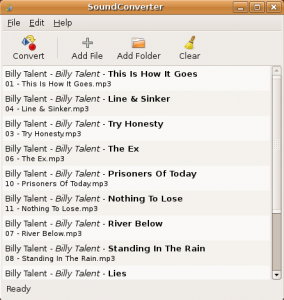
If you would like to convert your digital audio files to any number of available formats, SoundConverter is exactly what you’ve been looking for. Not only can you convert audio files in batch, but the application also maintains tag data and has a number of intuitive output options as well. The following is an excerpt taken from the projects home page.
“The sound conversion application for the GNOME environment. It reads anything the GStreamer library can read (Ogg Vorbis, AAC, MP3, FLAC, WAV, AVI, MPEG, MOV, M4A, AC3, DTS, ALAC, MPC, Shorten, APE, SID, etc…), and writes WAV, FLAC, MP3, and Ogg Vorbis files.”
Installing SoundConverter is a snap as most distributions have a binary package available, or you can build the latest version from source code. At the time of writing this aricle, Ubuntu 8.04 repositories have made available version 1.0.1, although the project is currently advertising 1.3.1. Yikes. A little out of date, but it still works extremely well.
Installing SoundConverter in Ubuntu/Debian*
*
sudo apt-get install soundconverter
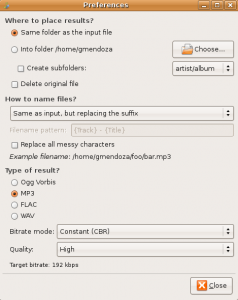
If you take a look at the preferences, you’ll also be pleasantly surprised to find a fine set of available options to control the quality of your newly converted files. Whether you are converting single files or entire collections, this SoundConverter is at your service.